TUTORIAL Prerequisites 2: Processing downloaded archives to prepare data for the workflow
[1]:
from pyaesa import set_workspace, process_pop_gdp, process_mrio, process_ar6
All of the following processing prepares input data before starting the AESA workflow. Once the required processed assets exist on disk, continue directly to the notebook that matches the study endpoint (aSoCC, IO-LCA, aCC, ASR in tutorials/study_objectives) rather than manually calling one by one every downstream function in sequence.
Once processed outputs are on disk they are reused by all subsequent AESA studies as long as what has been processed (regarding years + MRIO aggregation and disaggregation options and LCIA methods) corresponds to the study’s perimeter. Therefore once processing has been done once subsequent uses of pyaesa will considerably reduce computing time.
Before starting…
Prerequisites 0: Set workspace
Every tutorial notebook repeats set_workspace(...) as all function calls always assume it has already run in the current Python session. It defines paths for outputs.
[ ]:
# Windows example; update this path before running.
set_workspace(r"C:\Users\username\Documents\aesa_workspace")

# macOS example; update this path before running.
# set_workspace("/Users/username/Documents/aesa_workspace")
Prerequisites 1: Download data
Make sure you ran the notebook tutorials/core_prerequisites/1_download_data.ipynb in the same workspace.
Prerequisites 2: Process data
Processing converts the raw files downloaded by the download functions into tables and matrices that AESA workflow functions can reuse deterministically accross case studies.
This notebook covers the full Process family:
process_pop_gdp(...)process_mrio(...)process_ar6(...)
Downstream reuse summary:
Function |
Main outputs |
Reused later by |
|---|---|---|
|
harmonized historical and prospective SSP population/GDP tables |
|
|
processed MRIO tables, optional regional and sectoral MRIO aggregation and disaggregation, optional LCIA characterization |
|
|
harmonized dynamic climate change carrying capacity pathways |
|
Population and GDP PPP data: process_pop_gdp(...)
Description
What the function does and what later functions reuse from it
process_pop_gdp(...) harmonizes the raw historical and SSP population / GDP inputs into the processed tables later reused by allocation and projection workflows whenever the selected allocation methods depend on population, GDP, or GDP per capita drivers.
Some World Bank and SSP entities are aggregated under their “parent country” so that they are treated consistently within their corresponding EXIOBASE/OECD “parent country”, rather than as part of Rest of the World (RoW) regions.
This adjustment ensures coherence between World Bank/SSP datasets and EXIOBASE/OECD coverage, following the list of countries within EXIOBASE RoW regions described by Bjelle et al. (2020). Without this aggregation, several countries would incorrectly appear as belonging to RoW, although they are already accounted for within their parent country.
The “parent child” relationships used for this aggregation are defined in the matching files through the columns ``agg_parent`` and ``parent_iso3_code``.
Reference
Bjelle, E. L., Tobben, J., Stadler, K., Kastner, T., Theurl, M. C., Erb, K. H., Olsen, K. S., Wiebe, K. S., & Wood, R. (2020). Adding country resolution to EXIOBASE: Impacts on land use embodied in trade. Journal of Economic Structures, 9(1), 1-25.
Historical data (World Bank)
For World Bank data, the relevant “parent country” matching files are wb_exiobase_matching.csv and wb_oecd_matching.csv.
Missing data in the World Bank database are completed via log linear regression using all available years (logs are produced to report it).
In the World Bank database, Taiwan (TWN) is included within China (CHN) while reported separately in SSP scenarios. Therefore, to ensure consistency across datasets, Taiwan is added via the International Monetary Fund World Economic Outlook database, and removed from China (CHN) in the World Bank database.
Unit harmonization (GDP PPP base year rebasing): World Bank GDP series are retrieved as GDP, PPP constant 2021 international dollars. To ensure unit consistency with SSP projections expressed in constant 2017 international $, all World Bank GDP values are rebased from 2021 to 2017 international dollars by applying a single scalar conversion factor derived from the United States GDP deflator (World Bank indicator NY.GDP.DEFL.KD.ZG) compounded over 2018 to 2021.
Prospective data (SSP)
For SSP scenarios, the relevant “parent country” matching files are ssp_exiobase_matching.csv and ssp_oecd_matching.csv.
As SSP data are provided at five year intervals, intermediate years are estimated through linear interpolation.
Public argument checklist
The table lists all arguments; the same definitions are available in the function docstring.
Green items = default if omitted.
Do not write green items when the default is intended.
process_pop_gdp(…) arguments
Argument | Description |
|---|---|
past_years | If True, build the historical (World Bank + IMF) processed output. Default True includes the historical output. |
future_years | If True, build the SSP processed output. Default True includes the prospective output. |
refresh | If True, clear and recompute only the selected processed population and GDP tables under data_processed/pop_gdp. past_years=True refreshes wb_processed.csv, its metadata, and the World Bank fill log. future_years=True refreshes ssp_processed.csv and its metadata. Raw downloads and project outputs are not refreshed. Defaults to False. |
Running process_pop_gdp(...)
[ ]:
# Process both historical and future population / GDP inputs.
process_pop_gdp()
MRIO data: process_mrio(...)
Description
What the function does and what later functions reuse
process_mrio(...) parses the raw downloaded MRIO archives, computes AESA specific metrics and responsibility propagation matrices, optionally applies MRIO aggregation and disaggregation, and optionally performs LCIA characterization for EXIOBASE sources.
The processed MRIO archives are used by:
deterministic_asocc(...)reuses processed MRIO outputs for allocated sharesdeterministic_io_lca(...)anduncertainty_io_lca(...)reuse processed MRIO outputs for IO-LCA computation and later ASR LCA workflowsdeterministic and uncertainty aCC / ASR workflows depend on those same upstream outputs whenever they reuse allocation and/or IO-LCA results.
Method
MRIO parsing and AESA enacting metric processing
MRIO archives are parsed with the Python library PyMRIO (Stadler, 2021).
The baseline processing option computes UNCASExt metrics (see Appendix A in de Bantel et al., 2026) later used by allocation:
utility enacting metrics: final demand (
FD) and gross value added (GVA)utility propagation matrices:
x_to_rc,kappa, andomega_regEXIOBASE LCIA enacting metrics when
lcia_methodis requested: consumption based (CBA) and production based (PBA) accounting
Before enacting metric computation, clipped non negativity rules are applied to:
FD(Yafter summing across final demand categories and producing regions)GVA(factor_inputs.Fafter summing across value added categories)
Negative totals are clipped to zero, and clipping diagnostics are written under data_processed/logs/mrio_logs/.
Reference
Stadler, K. (2021). Pymrio - A Python Based Multi Regional Input Output Analysis Toolbox. Journal of Open Research Software, 9(1). https://doi.org/10.5334/jors.251
Optional persistence outputs
The following processing options are optional and default to False in process_mrio(...). They are not required by the allocation workflow and should usually remain disabled to reduce on disk output size and processing time.
keep_intermediate_uncasext=Trueneeded only by
deterministic_io_lca(..., upstream_analysis=True)to compute diagnostic upstream supply chain decomposition of impact sourceskeeps UNCASExt post clip core matrices at the year root (
A,G,L,Z)keeps characterized LCIA extension matrices used by UNCASExt LCIA computations (
S,M) underextensions/<method>/increases one year processed MRIO storage by about +1.9 GB for EXIOBASE 3.10.2 ixi (about 9.4x total), +2.9 GB for EXIOBASE 3.10.2 pxp (about 11.3x total), and +500 MB for OECD ICIO v2025 (about 3.4x total)
pymrio_calc_all=True(never used by downstream pyaesa public functions)computes and stores the full PyMRIO
calc_allpayload underpreclip/stores preclip core matrices and LCIA related matrices when LCIA method(s) are requested
When both are enabled, both are written in addition to the baseline UNCASExt enacting metrics and propagation matrices. Enabling either processing option increases I/O, and enabling pymrio_calc_all=True also increases compute time substantially.
Optional MRIO aggregation and disaggregation (regions / sectors)
Depending on the study objective, users may need to reclassify native regions and/or sectors. A mapping can keep native labels, aggregate several native labels into one target label, or disaggregate one native label into several target labels with weights.
The same instructions are reproduced in README_aggregation.txt in the active data_raw/mrio/<source>/aggregation folder.
Workflow:
Copy the appropriate aggregation template from the MRIO aggregation folder
data_raw/mrio/<source>/aggregationin the workspace.Sector templates:
OECD:
data_raw/mrio/oecd_v2025/aggregation/agg_sec_template.csvEXIOBASE ixi:
data_raw/mrio/exiobase_3/aggregation/ixi/agg_sec_template.csvEXIOBASE pxp:
data_raw/mrio/exiobase_3/aggregation/pxp/agg_sec_template.csv
N.B.: A detailed description of sectors provided by EXIOBASE is reproduced:
data_raw/mrio/exiobase_3/sector_classification.xlsxRegion templates:
OECD:
data_raw/mrio/oecd_v2025/aggregation/agg_reg_template.csvEXIOBASE:
data_raw/mrio/exiobase_3/aggregation/agg_reg_template.csv
Save the copied file as
agg_reg_<name>.csvand/oragg_sec_<name>.csv.Edit the
aggregated_mriocolumn.No blank values are allowed.
Each row maps one original region or sector label to one target label in
aggregated_mrio.For aggregation, several original labels can share the same target label.
For disaggregation, repeat the same original label on several rows, assign each row a different target label, and provide a
weightcolumn whose weights sum to1for that original label.If a label should stay unchanged, repeat its original name in
aggregated_mrio.
Run
process_mrio(...)with MRIO aggregation and disaggregation enabled:
agg_reg = True        # for regional MRIO aggregation and disaggregation
agg_sec = True        # for sector MRIO aggregation and disaggregation
agg_version = "<name>"
If both region and sector mappings are used, both mapping CSVs should share the same <name>. When loading processed MRIOs in that custom classification later, use agg_version="<name>" consistently.
Packaged aggregation examples shipped with the package
The MRIO aggregation folders include ready to use region and sector aggregation examples. Inspect each CSV in data_raw/mrio/<source>/aggregation/ before using it so the selected agg_version and output aggregated_mrio labels are clear.
Region aggregation examples
``agg_reg_eu27``
Aggregates all EU member states into a single region EU27. All other regions remain unchanged.
It can be called in processing via:
agg_reg = True
agg_version = "eu27"
``agg_reg_world``
Aggregates all regions into a single region World.
It can be called in processing via:
agg_reg = True
agg_version = "world"
EXIOBASE ixi sector aggregation examples
``agg_sec_elec``
Aggregates EXIOBASE ixi electricity sectors together.
``agg_sec_oecd_d``
Aggregates EXIOBASE ixi electricity, gas, and water sectors to match OECD ICIO sector D resolution.
LCIA uncertainty CoV companions for aggregated EXIOBASE regions
For EXIOBASE LCIA uncertainty with the packaged agg_reg regional mappings, matching reg_cbca_covs_agg_eu27.csv and reg_cbca_covs_agg_world.csv files are shipped in data_raw/mrio/exiobase_3/lcia/carbon_accounts_covs/. Follow README_agg_reg_and_group_indices_lcia_covs.txt in the same folder when writing a custom MRIO agg_reg or group_indices CoV file.
Optional LCIA characterization
lcia_method accepts one method name or a list of method names, for example lcia_method=["pb_lcia", "gwp100_lcia"]. If no lcia_method is provided, no LCIA characterization is computed.
Additional LCIA methods can be considered by the package. See the tutorial section below.
pb_lcia
The Planetary Boundary life cycle impact assessment method (PB-LCIA) was introduced by Ryberg et al. (2018). The package characterization matrices combine that method family with updates from Yang & Paulillo (2025, 2026) and the BI FD implementation from Galan Martin et al. (2021).
Modified compared to the cited sources
For the Biosphere Integrity planetary boundary, the Functional Diversity control variable via the Biodiversity Intactness Index is selected (BI FD). BI FD implementation follows Galan Martin et al. (2021). This control variable is also available for process based LCA in the ASR route.
N.B.
In this package, the BI FD control variable is divided into BI FD GHG and BI FD LAND to distinguish climate and land use related components. This separation is necessary to ensure that historical responsibility is calculated consistently for each driver. For climate change, cumulative GHG emissions over time must be considered. In contrast, the land use indicator measures annual area occupied, not newly converted area, meaning that the same land appears every year if it remains in use. Therefore, summing land occupation values over multiple years would result in double counting the same area. In the final results, both are then summed back together to form a single BI FD control variable.
For BI FD GHG, the PB-LCIA characterization matrix proposed in this package uses an updated GHG list and characterization factors aligned with EF 3.1, as proposed by Yang & Paulillo (2025, 2026). The added greenhouse gas stressors are documented in the packaged characterization matrix.
For BI FD LAND, cropland stressors are mapped to the former Occupation, annual crop stressor. Infrastructure land is represented through artificial surfaces for the Occupation, urban stressor.
References
Yang, Q., & Paulillo, A. (2026). Quantifying environmental impacts on planetary boundaries: A refined and validated impact assessment method. Environmental Impact Assessment Review, 119, 108355. https://doi.org/10.1016/j.eiar.2026.108355
Yang, Q., & Paulillo, A. (2025). Advancing Planetary Boundaries Allocation: Systematic Comparison of Sharing Principles for National Level Absolute Environmental Sustainability Assessments. Procedia CIRP, 135, 875-880. https://doi.org/10.1016/j.procir.2024.12.087
Vazquez, D., Galan Martin, A., Tulus, V., & Guillen Gosalbez, G. (2023). Level of decoupling between economic growth and environmental pressure on Earth system processes. Sustainable Production and Consumption, 43, 217-229. https://doi.org/10.1016/j.spc.2023.11.001
Galan Martin, A., Tulus, V., Diaz, I., Pozo, C., Perez Ramirez, J., & Guillen Gosalbez, G. (2021). Sustainability footprints of a renewable carbon transition for the petrochemical sector within planetary boundaries. One Earth, 4(4), 565-583. https://doi.org/10.1016/j.oneear.2021.04.001
gwp100_lcia
This LCIA method characterizes greenhouse gas stressors with factors aligned with EF 3.1, following Yang & Paulillo (2025, 2026).
References
Yang, Q., & Paulillo, A. (2026). Quantifying environmental impacts on planetary boundaries: A refined and validated impact assessment method. Environmental Impact Assessment Review, 119, 108355. https://doi.org/10.1016/j.eiar.2026.108355
Yang, Q., & Paulillo, A. (2025). Advancing Planetary Boundaries Allocation: Systematic Comparison of Sharing Principles for National Level Absolute Environmental Sustainability Assessments. Procedia CIRP, 135, 875-880. https://doi.org/10.1016/j.procir.2024.12.087
Adding additional LCIA methods
The instructions for adding custom EXIOBASE LCIA characterization matrices are reproduced in data_raw/mrio/exiobase_3/lcia/characterization_factors_matrices/README_add_custom_lcia_characterization_matrices.txt.
Proposition of new publicly available LCIA methods
Users are encouraged to propose additional publicly available LCIA methods via a pull request so they can be integrated into the package list of supported lcia_method and made available to all users.
Tutorial: adding new LCIA methods (for personal use and/or to prepare a public release)
1. Characterization matrix used directly for EXIOBASE characterization
These instructions are reproduced in
data_raw/mrio/exiobase_3/lcia/characterization_factors_matrices/README_add_custom_lcia_characterization_matrices.txt.Add the characterization matrix as
data_raw/mrio/exiobase_3/lcia/characterization_factors_matrices/<method>.csvTwo characterization template families are accepted:
standard template:
name_lcia_template.csvplanetary boundary template:
name_lcia_planetary_boundary_template.csv
The method name must match the filename stem because the package resolves the characterization file as
data_raw/mrio/exiobase_3/lcia/characterization_factors_matrices/<method>.csvThis is the file used directly when
lcia_method="<method>"is requested inprocess_mrio(...),deterministic_io_lca(...), ordeterministic_asocc(...)Direct characterization uses the
impactrows, notimpact_parent, for the characterization algebra itselfEven so, if the method may later be used with historical responsibility allocation method, structure the characterization matrix from the beginning with the final parent category in
impact_parentand the specific split sub impact inimpactwhen no split is needed, write the same label in both columns
this keeps the characterization matrix aligned with the later
<method>_rps.csvmapping and with parent level impact unit tracking
Use the standard template when a generic
impact_full_namelabel is sufficientUse the planetary boundary template only when the file should preserve explicit
Planetary boundary/Control variablevocabularyfor concrete patterns, see
name_lcia_template.csv,name_lcia_planetary_boundary_template.csv, and the PB-LCIA note above regarding BI FD
All the following EXIOBASE extension families can be characterized: land, employment, material, air emissions, water, factor inputs, nutrients
2. Responsibility period table used only by historical responsibility allocation method (PR-HR at country level)
These instructions are reproduced in
data_raw/mrio/exiobase_3/lcia/responsibility_periods/README_add_custom_lcia_responsibility_periods.txt.Add the responsibility period table as
data_raw/mrio/exiobase_3/lcia/responsibility_periods/<method>_rps.csvTwo responsibility period template families are accepted:
standard template:
name_lcia_rps_template.csvplanetary boundary template:
name_lcia_rps_planetary_boundary_template.csv
This table is needed only for applying the historical responsibility allocation method
The package resolves it as
data_raw/mrio/exiobase_3/lcia/responsibility_periods/<method>_rps.csvReuse the same
impact/impact_parentstructure as in the characterization matrixThis is where the specific responsibility period is actually defined for each
impact, while later aggregation back to the parent category followsimpact_parentUse the standard template when a generic
impact_full_namelabel is sufficientUse the planetary boundary template only when the file should preserve explicit
Planetary boundary/Control variablevocabulary and detailed duration or citation notesfor concrete patterns, see
name_lcia_template.csv,name_lcia_planetary_boundary_template.csv,name_lcia_rps_template.csv,name_lcia_rps_planetary_boundary_template.csv, and the PB-LCIA note above regarding BI FD
3. Static carrying capacity file used by denominator workflows
These instructions are reproduced in
data_raw/carrying_capacities/README_add_custom_carrying_capacities.txt.If the new LCIA method should also support package static carrying capacity workflows, add
pyaesa/workspace_initialisation/prerequisites/carrying_capacities/<method>_cc_steady_state.csvTwo template families are accepted:
standard template:
name_lcia_cc_steady_state_template.csvplanetary boundary template:
name_lcia_cc_steady_state_planetary_boundary_template.csv
Use the standard template when the file should expose the generic label column
impact_full_nameUse the planetary boundary template only when the file should preserve explicit
Planetary boundary/Control variablevocabularyThis template choice does not change the computations. The package normalizes both schemas to the same internal contract for validation, figure metadata, aCC, ASR, and external file checks. The difference is only the accepted column vocabulary and the resulting display labels
The standard schema requires
impact_full_name,impact,impact_unit,min_cc, andmax_ccThe planetary boundary schema requires
Planetary boundary,Control variable,impact,impact_unit,min_cc, andmax_ccMost new LCIA methods can be added by files only once the characterization matrix, the optional responsibility period table, and the optional static carrying capacity CSV exist
Dynamic AR6 carrying capacity workflows can use any LCIA method whose static carrying capacity CSV contains an impact row equal to
GWP_100; other impact categories remain steady state.
Available MRIO sources
Source key |
Historical temporal coverage |
Notes |
|---|---|---|
|
1995-2024 |
EE MRIO: EXIOBASE ixi option; 2023 and 2024 are nowcasted |
|
1995-2024 |
EE MRIO: EXIOBASE pxp option; 2023 and 2024 are nowcasted |
|
1995-2022 |
MRIO: OECD ICIO ixi |
EXIOBASE 3.9.6 is also available as ``exiobase_396_ixi`` and ``exiobase_396_pxp`` for 1995-2022.
Approximate process_mrio(...) first run storage and runtime:
Source |
One year |
All years |
|---|---|---|
|
230 MB, 1 min |
6.7 GB and 25 min for 1995-2024 |
|
280 MB, 1 min |
8.2 GB and 36 min for 1995-2024 |
|
210 MB, <1 min |
5.8 GB and 5 min for 1995-2022 |
Measurements use original classification, ``keep_intermediate_uncasext=False``, and ``pymrio_calc_all=False``. EXIOBASE measurements use ``lcia_method=”pb_lcia”``. They were taken on Windows 11 with Python 3.14, an 11th Gen Intel Core i7 1165G7 CPU, 32 GB RAM.
Public argument checklist
The table lists all arguments; the same definitions are available in the function docstring.
Green items = default if omitted.
Orange items = optional feature skipped if omitted.
Do not write green or orange items when that behavior is intended.
process_mrio(…) arguments
Argument | Description |
|---|---|
source | MRIO source key (“exiobase_396_ixi”, “exiobase_396_pxp”, “exiobase_3102_ixi”, “exiobase_3102_pxp”, or “oecd_v2025”). |
years | Studied years. Accepts a single year, list, or range. If omitted, all available MRIO years for the selected source and agg_version are used. |
refresh | If True, clear and recompute only the requested processed MRIO year folders inside the resolved source and classification output scope. The output scope is data_processed/mrio/<source>/<version_tag>, where version_tag is original_classification for native source classification or custom_classification_<agg_version> for custom MRIO aggregation and disaggregation processing. For each requested year, the corresponding processed year folder and metadata year entry are removed before recomputation. Raw downloads and project outputs are not refreshed. Defaults to False. |
lcia_method | LCIA method(s) used to characterize MRIO environmental stressors into the selected method(s) impact categories (for example “pb_lcia” or [“pb_lcia”, “gwp100_lcia”]). None skips LCIA characterization. Defaults to None. pyaesa currently supports LCIA characterization only for EXIOBASE sources. To add a custom LCIA method, follow README_add_custom_lcia_characterization_matrices.txt in data_raw/mrio/exiobase_3/lcia/characterization_factors_matrices/ and pass the custom method file stem here. |
agg_reg | If True, reclassify MRIO regions with the agg_reg_<agg_version>.csv MRIO aggregation and disaggregation mapping. The mapping can keep native labels, aggregate several native regions into one target label, or disaggregate one native region across several target labels when a weight column is provided. Default False keeps native source regions. |
agg_sec | If True, reclassify MRIO sectors with the agg_sec_<agg_version>.csv MRIO aggregation and disaggregation mapping. The mapping can keep native labels, aggregate several native sectors into one target label, or disaggregate one native sector across several target labels when a weight column is provided. Default False keeps native source sectors. |
agg_version | Name token used to resolve the matching agg_reg_<agg_version>.csv and/or agg_sec_<agg_version>.csv MRIO aggregation and disaggregation mapping files in data_raw/mrio/<source>/aggregation. Required when agg_reg or agg_sec is True. Defaults to an empty string for native source classification. Use the same token in downstream calls that should reuse the processed classification. If a mapping file has a weight column, weights must sum to 1 for each original label. If custom regional classification outputs are later used with LCIA uncertainty, also follow README_agg_reg_and_group_indices_lcia_covs.txt in data_raw/mrio/exiobase_3/lcia/carbon_accounts_covs/. |
keep_intermediate_uncasext | If True, keep intermediate UNCASExt matrices. These outputs are not used by downstream public functions, except by deterministic_io_lca(…) when upstream supply chain analysis is requested with upstream_analysis=True. Written files are the post clip core matrices (A, G, L, Z, unit), plus characterized LCIA extensions/ payloads. This increases one year processed MRIO storage by about +1.9 GB for EXIOBASE 3.10.2 ixi (about 9.4x total), +2.9 GB for EXIOBASE 3.10.2 pxp (about 11.3x total), and +500 MB for OECD ICIO v2025 (about 3.4x total). Default False writes only the public processed outputs. |
pymrio_calc_all | If True, write PyMRIO function calc_all outputs. These outputs are not used by downstream public functions. The written payload is PyMRIO calc_all on original matrices without clipping negative values, stored under preclip/ and preclip/extensions/. Default False skips this diagnostic payload. |
Running process_mrio(...)
Example 1 - EXIOBASE 3.10.2 IXI with LCIA characterization
[ ]:
process_mrio(
    source="exiobase_3102_ixi",
    lcia_method=["pb_lcia", "gwp100_lcia"],
    refresh=True,
)
Example 2 - EXIOBASE 3.10.2 PXP with LCIA characterization
Uncomment and run the next cell only if you need to process EXIOBASE in pxp version.
[ ]:
# process_mrio(
#     source="exiobase_3102_pxp",
#     lcia_method=["pb_lcia", "gwp100_lcia"],
# )
Example 3 - aggregated EXIOBASE 3.10.2 IXI with aggregation of EU27 countries
[ ]:
process_mrio(
    source="exiobase_3102_ixi",
    lcia_method=["pb_lcia", "gwp100_lcia"],
    agg_reg=True,
    agg_version="eu27",
)
Dynamic climate change carrying capacities via IPCC AR6 scenario data: process_ar6(...)
Use this section only when the study needs dynamic climate change carrying capacities. Static carrying capacity workflows do not need AR6 processing.
Downstream dynamic AR6 CC, aCC, and ASR functions create or reuse the matching process_ar6(...) scope automatically when they need it. Run process_ar6(...) directly only when you want to prepare or inspect the broad retained pathway table, logs, budget summaries, and diagnostic figures before calling a study endpoint function.
download_ar6(...) must have run before this function can read raw AR6 inputs.
Description
What the function does and what later functions reuse
process_ar6(...) processes the downloaded AR6 Scenario Explorer pathways to produce variables for both GHG (Kyoto gases) emissions and CO2 emissions. This includes net, gross, and gross_alt emissions (all including and excluding AFOLU emissions) for the requested AR6 climate categories and SSPs SSP1-SSP5. The default category selector is C1 to C4, the categories aligned with the 2015 Paris Agreement; C5 to C8 are available when explicitly requested:
Kyoto Gases emissions:
Emissions(net)|Kyoto Gases,Emissions(net)|Kyoto Gases|WO AFOLUEmissions(gross)|Kyoto Gases,Emissions(gross)|Kyoto Gases|WO AFOLUEmissions(gross_alt)|Kyoto Gases,Emissions(gross_alt)|Kyoto Gases|WO AFOLU
CO2 emissions:
Emissions(net)|CO2,Emissions(net)|CO2|WO AFOLUEmissions(gross)|CO2,Emissions(gross)|CO2|WO AFOLUEmissions(gross_alt)|CO2,Emissions(gross_alt)|CO2|WO AFOLU
Carbon sequestration emissions variables are also produced as companion for the gross and gross_alt emissions:
Carbon sequestration:
Carbon Sequestration|Subtotal_seqCarbon Sequestration|Total
Outputs are later reused by:
deterministic_ar6_cc(...)uncertainty_ar6_cc(...)dynamic
deterministic_acc(...)dynamic
uncertainty_acc(...)dynamic
deterministic_asr(...)dynamic
uncertainty_asr(...)
The AR6 category filter is there to define dynamic climate change carrying capacity budgets aligned with the 2015 Paris Agreement with different underlying risk levels and overshoot profiles:
C1: limit warming to1.5 degrees C(>50%) with no or limited overshootC2: return warming to1.5 degrees C(>50%) after a high overshootC3: limit warming to2 degrees C(>67%)C4: limit warming to2 degrees C(>50%)
Categories C5 to C8 are also available in processed outputs when requested explicitly.
At this processing stage the selected categories and all five SSP families are kept for the selected study window. Later deterministic_ar6_cc(...) and uncertainty_ar6_cc(...) calls can then either restrict the study to a subset of categories / SSP families or combine several selected categories / SSP families in the same study scope depending on the study objective.
The requested years selector defines the study window that drives every later filtering and harmonization decision: retained variable-scenario combinations must cover the full requested window at both ends (years in between are interpolated when missing), and harmonization offsets pathways given historical emissions observed until the study start year vs. what originally considered by pathways.
Method
A high-level graphical overview is provided below to summarize the different steps implemented in process_ar6(...) to define dynamic carrying capacities. Methodological details on AR6 scenario filtering, harmonization, and dynamic carrying capacity construction are provided in methodological_notes/methodological_note__steady_state__dynamic_cc.pdf.
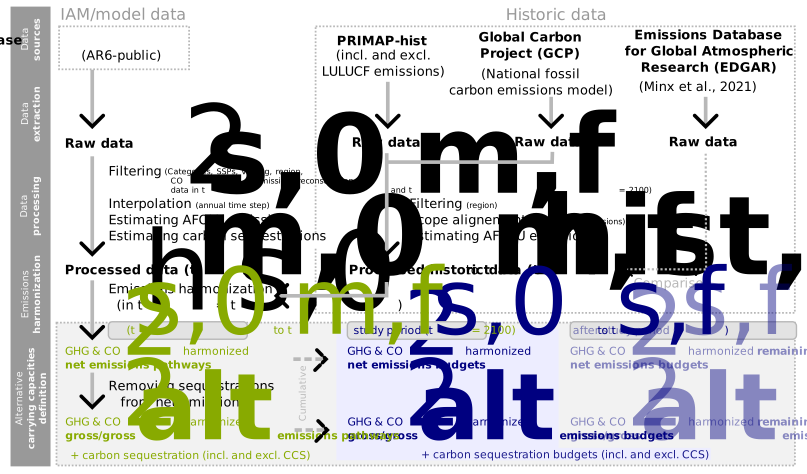
Harmonization and pathway construction
For each AR6 category/SSP bucket, the function applies the same processing chain:
Raw filtering and yearly normalization
Rows are filtered from the downloaded public explorer for one
Category/SSPbucket and reshaped onto the package yearly grid2000-2100.Only AR6-vetted model-scenarios are considered.
Internal missing years are linearly interpolated (AR6 scenarios are provided at 5-year or 10-year intervals), but truncated starts and truncated ends are kept as missing values. The function therefore fills only inside existing reported spans; it does not extrapolate before the first reported year or after the last reported year.
An additional filtering ensures that
Emissions|CO2can be reconstructed via all its subcontributionsEmissions|CO2|...with a reconstruction error below 0.001% of cumulative emissions on the scenario time horizon.
AFOLU handling and variable construction
The raw explorer provides direct
Emissions(net)|Kyoto GasesandEmissions(net)|CO2totals, plus AFOLU component rows.Emissions(net)|CO2|WO AFOLUis derived by subtractingEmissions(net)|CO2|AFOLUfrom total CO2.Emissions(net)|Kyoto Gases|AFOLUis rebuilt from the available AFOLU gas components in the explorer all converted to CO2-eq GWP100 :Emissions(net)|CO2|AFOLU + Emissions|CH4|AFOLU + Emissions|N2O|AFOLU.Emissions(net)|Kyoto Gases|WO AFOLUis then derived by subtracting that reconstructed AFOLU subtotal from total Kyoto Gases.If the required AFOLU component rows are incomplete for certain AR6 scenarios, the package keeps the directly reported total (
Emissions(net)|CO2orEmissions(net)|Kyoto Gases) and logs the derived...|WO AFOLUrow as not produced.
Study window eligibility
After interpolation and AFOLU handling, a row is retained only if it has a finite value at both the study start year and the study end year.
This is how the function enforces temporal comparability: pathways that start after the requested start year or stop before the requested end year are excluded.
Historical baseline and harmonization
When
harmonization=True, the function aligns AR6 pathways to observed historical emissions between pathways starting years and requested study start year while preserving each scenario cumulative emissions budget, following Gidden et al. (2018). Note that emissions infilling is not performed here.Historical emissions are collected by
download_ar6from PRIMAP and Global Carbon Budget for bunker CO2 additions (see output folder for reference citations .txt).harmonization_methodcurrently supports only"offset". Under this method, the pathway is anchored to the historical baseline at the harmonization year, the cumulative difference between pathway and historical emissions over the harmonization window is computed, and that delta is redistributed as one uniform annual correction from the year after harmonization to a row specific horizon so the scenario cumulative budget is preserved.constant_offsetis used when the pathway never becomes negative. The uniform annual correction is applied from after the study start year through the last available pathway year.reduced_offsetis used when the pathway reaches negative emissions. The uniform annual correction is applied only up to the model net zero proxy year, defined as the year immediately before the first negative emissions year, rather than through the full remaining pathway horizon.
Following the UNCASExt framework (de Bantel et al., 2026), pyaesa can further shorten the effective harmonization horizon when needed so the correction does not create an earlier negative emissions year than in the original pathway.
Estimation of gross and gross_alt emissions
Harmonized net emissions are then used to estimate
grossandgross_altemissions for GHG and CO2 variables. This ensures that the dynamic carrying capacities is always positive, which is necessary to apply justice distributive theory with currently available sharing principles.Based the AR6 data, carbon sequestrations are extracted for each model-scenarios and two variables are defined:
Carbon Sequestration|Subtotal_seq, as the sum of all carbon sequestrations except carbon capture and storage (CCS). This is motivated by the fact that CCS is a different form of sequestration as it acts at the source of emissions, whereas other carbon sequestration variables in the AR6 remove carbon from the atmosphere.Carbon Sequestration|Total, as the sum of all carbon sequestration contributions, including CCS.
Gross emissions are then computed by removing carbon sequestration from net emissions. This yields respectively
gross_altandgrossvariables. A final check filters out model-scenarios for whichgross_altandgrossemissions are not always positive.
Final tables written
ORIGINAL_AR6keeps the post interpolation, post AFOLU source table before harmonization.The final pathways sheet keeps either harmonized retained pathways or non harmonized retained pathways.
The budget statistics sheet summarizes retained rows by AR6 category and by category/SSP bucket.
Harmonized runs also write a separate harmonization log workbook with row level correction diagnostics.
References
Gidden, M. J., Fujimori, S., van den Berg, M., Klein, D., Smith, S. J., van Vuuren, D. P., & Riahi, K. (2018). A methodology and implementation of automated emissions harmonization for use in Integrated Assessment Models. Environmental Modelling & Software, 105, 187-200.
de Bantel, E. I., Pirson, T., Puig-Samper, G., Hartmann, J. M., Bouillass, G., Yannou, B., Jankovic, M., Bol, D., & Hauschild, M. Z. UNCASExt – Extending the UNCASE Framework to Quantify Uncertainties in Retrospective and Prospective Absolute Environmental Sustainability Assessments (AESA) [Manuscript submitted for publication].
Optional diagnostic figures
When figures=True, figures are generated only for harmonized runs because the figure workflow depends on the harmonized pathways, the historical baseline, and the harmonization log. The figure set is diagnostic only, not necessary for any subsequent workflow. It includes:
a historical baseline figure showing the PRIMAP + GCP series used for harmonization
pathway comparison figures showing retained original pathways versus retained harmonized pathways by output variable
harmonization diagnostics showing yearly correction sizes, pathway versus historical cumulative ratios, and timing diagnostics around the harmonization horizon / net zero behavior
budget figures showing pathway panels plus study period and remaining budget distributions by category and by category/SSP bucket
a warming figure showing the distribution of the AR6 field
Median warming in 2100 (MAGICCv7.5.3)for the retained model-scenario pairsa sequestration figure showing the carbon sequestrations subcontributions for all model-scenarios included, sorted by categories.
figure only Monte Carlo sampling comparison figures comparing two pathway rendering methods used in later uncertainty workflows: seeded simple random sampling (SRS), where each run samples retained pathways with equal probability, and package labelled Latin hypercube sampling (LHS), where runs are stratified (first IAM model is rendered then within Scenario)
The SRS versus LHS figure is only a diagnostic figure. The purpose is to show the effect of choosing one pathway rendering method or the other before selecting the Monte Carlo approach for the study endpoint of interest (dynamic climate change AR6 carrying capacity, aCC, or ASR)
When this processing option is needed
Use this processing option only if the study needs dynamic climate change carrying capacities.
process_ar6(...) writes the broad retained pathway table for the selected study years. Later dynamic AR6 CC functions can then narrow the saved table by category, SSP family, or model-scenario subset, depending on the study objective. The processed workbook includes a README worksheet, and the model-scenario subset template is documented by data_processed/ar6/<processed_scope>/README_model_scenario_subset.txt.
Public argument checklist
The table lists all arguments; the same definitions are available in the function docstring.
Green items = default if omitted.
Do not write green items when the default is intended.
process_ar6(…) arguments
Argument | Description |
|---|---|
years | Study year selector provided as a consecutive year list or range(start_year, end_year + 1). The resolved years must contain at least two consecutive years with no gaps. |
figures | Whether to render figures. Default is True. |
harmonization | Whether to harmonize retained AR6 pathways to the historical baseline. Defaults to True. If True, write harmonized_ar6_public.xlsx plus the separate harmonization log workbook harmonized_ar6_public_log.xlsx. If False, apply the same required CO2 coverage and derived variable construction filters, write filtered_original_ar6_public.xlsx, and omit the harmonization log workbook. When required component inputs are missing for a derived retained variable, the package omits that derived row and records the omission in the AR6 row issue log. The required CO2 coverage, CO2 reconstruction, sequestration, and gross emissions filters are shared with the harmonized mode. Figure generation is available for harmonized runs. |
harmonization_method | Harmonization method applied only when harmonization=True. Defaults to “offset”. The only supported value is currently “offset”. Ignored when harmonization=False. |
category | AR6 category classification selector for global warming trajectories. Accepts a string such as “C3” or a list such as [“C1”, “C2”]. Valid values are “C1” through “C8”. Defaults to [“C1”, “C2”, “C3”, “C4”], the categories aligned with the 2015 Paris Agreement. |
refresh | If True, clear and recompute only the resolved processed AR6 output scope for the requested study period, harmonization flag, and harmonization method. Raw downloads and downstream AR6 CC, aCC, or ASR outputs are not refreshed. Defaults to False. |
figure_format | Figure render settings mapping. Defaults to {“format”: “png”, “dpi”: 500}. Nested keys: • format: Figure file format. Accepted values are “png”, “pdf”, and “svg”. • dpi: Positive integer figure resolution used for raster outputs. |
figure_convergence_tol | Relative convergence tolerance used only by the SRS/LHS figure sampling diagnostics when figures=True. The default is 5e-2, i.e. a 5% maximum relative change between successive checkpoint summaries for each monitored summary statistic. Figure sampling is accepted only after 3 consecutive stable checkpoint comparisons. Because the figure workflow evaluates those comparisons every 10000 runs per bucket, the earliest accepted convergence checkpoint is 40000 completed runs per bucket. |
figure_convergence_max_runs | Maximum per bucket run count allowed for the SRS/LHS figure sampling convergence loop when figures=True before figure generation fails. Default: 20000000. |
Running process_ar6(...)
Example 1: default harmonization method (offset)
Currently the only supported method is offset, so the argument can be omitted to use it by default.
[ ]:
process_ar6(
    years=range(2019, 2061),
)
What to do next
You have now been through the three prerequisites notebooks, congratulations!
It is now time to dive into the next batch of tutorials to discover study objectives and functional units in pyaesa: these are two central concepts.
Start with tutorials/study_objectives/0_study_objectives.md.